Billing / Orders / Stock / Credit / Profit

Run the counter, the stockroom and the books from one screen.

ShelfBill is billing software for shops and cafés. Take orders, print GST bills, collect UPI, keep track of stock and credit, and see your real profit at the end of the day.

  • Phone, tablet or laptop
  • GST, UPI and WhatsApp built in
  • Add-ons only when you need them

Sound familiar?

Running a shop shouldn't feel like this.

Most shops start on paper and a phone calculator. It works, until the day it doesn't. Here is what changes.

  • Prices live in your head or on a slip of paper

    One price list: sizes, add-ons and tax, set once.

  • Adding up bills by hand, getting the GST wrong

    Tax worked out on every bill: CGST + SGST, or IGST.

  • Orders shouted across the floor, some forgotten

    Every order lands on screen with an alert. Tables order from their own phone.

  • Udhar in a notebook, dates forgotten

    Credit tied to a mobile number, with a due date and a list of who to ask today.

  • Running out of milk on the busiest day

    Stock that counts itself down on every sale, with re-order suggestions.

  • Rent and salaries never counted, so “profit” is a guess

    Running costs recorded and taken off, so the profit shown is real.

  • Numbers scattered over a notebook, a bank app and memory

    One report: sales, payments, customers, money to collect, profit or loss.

How it fits together

One flow, from the first tap to the last rupee.

Nothing is typed twice. What you set up in one place is used by every place after it.

  1. 1

    Add what you sell

    Prices, sizes, tax, photos.

  2. 2

    Take the order

    At the counter or from a table's QR.

  3. 3

    Bill and collect

    Cash, UPI or pay later.

  4. 4

    Stock follows

    Every sale counts stock down.

  5. 5

    Chase credit

    A clear list of who owes what.

  6. 6

    See your profit

    The real number, after every cost.

Every module, explained

Everything in the app, one screen at a time.

Each section below is a part of the product, what it does, and the everyday problem it takes off your hands. Parts marked Add-on are switched on for your shop when you want them.

01Dashboard

Open the app. Know how the day is going.

Sales, orders and best sellers for today, the last 7 or 30 days, or any dates you choose. All on one screen, with no spreadsheet and no counting at closing time.

  • Totals that follow your dates Pick today, 7 days, 30 days or a custom range, and every number and the chart change with it.
  • A sales chart you can read in a second See which days were strong and which were slow.
  • Best sellers, ranked What really sells, in pages that stay quick even with hundreds of items.
  • Pay-later bills at a glance The latest credit given, right where you will notice it.

Takes care of: No more adding up the day's slips at closing time.
02Items

One price list for the whole shop.

Add what you sell once, with its price, tax and photo. The order screen, the bills and the reports all read from here, so nothing is ever typed twice.

  • Sizes with their own prices Small, Medium, Large. Or 500 ml and 1 L. Each size has its own price.
  • Add-ons Extra cheese, an extra shot: priced separately and added to any item in one tap.
  • Sold by weight or volume Price per kg, g, L or ml. Sell 100 g of a ₹40/kg item and the bill says ₹4.
  • Tax on every item Set the rate and an HSN or SAC code, and both print on the bill.
  • Categories and photos A photo grid that is quick to tap, even for a new cashier.
  • Switch off when sold out The item leaves the order screen at once and comes back with one tap.

Takes care of: Prices stop living in your head.

03Take an order

Tap, tap, done. Even on a busy counter.

Pick items from a photo grid, set the quantity, add a customer name or a table. The order stays open until it is paid, so more can be added whenever the customer asks.

  • Search and categories Find an item by typing a few letters, or jump to its category.
  • Sizes and add-ons in the same tap Choose the size, tick the add-ons, and the price updates as you go.
  • Orders that stay open A table keeps ordering through the evening. Add items to the same order, bill once.
  • Same screen on any device Phone, tablet or laptop. Nothing to install on a till.

Takes care of: No slow billing, no missed items.

04Checkout and invoices

A correct bill, paid and shared in seconds.

Tax is worked out for you, the UPI QR carries the exact amount, and the invoice can be printed or sent on WhatsApp straight from the screen.

  • GST done right CGST and SGST inside your state, IGST outside it. Your GSTIN and each item's rate are on the bill.
  • Discounts with a reason In rupees or percent, with a reason written down, and never above the limit you set.
  • Cash, UPI or pay later A UPI QR is shown with the exact amount, so there is no doubt about what was paid.
  • Print on any paper A4, 80 mm or 58 mm thermal receipt, with your footer note.
  • Share on WhatsApp The customer gets a link to their bill on their own phone.
  • Void with a reason A mistake is cancelled, not deleted. The stock comes back and the record stays.

Takes care of: No tax mistakes, no doubt about a UPI payment.

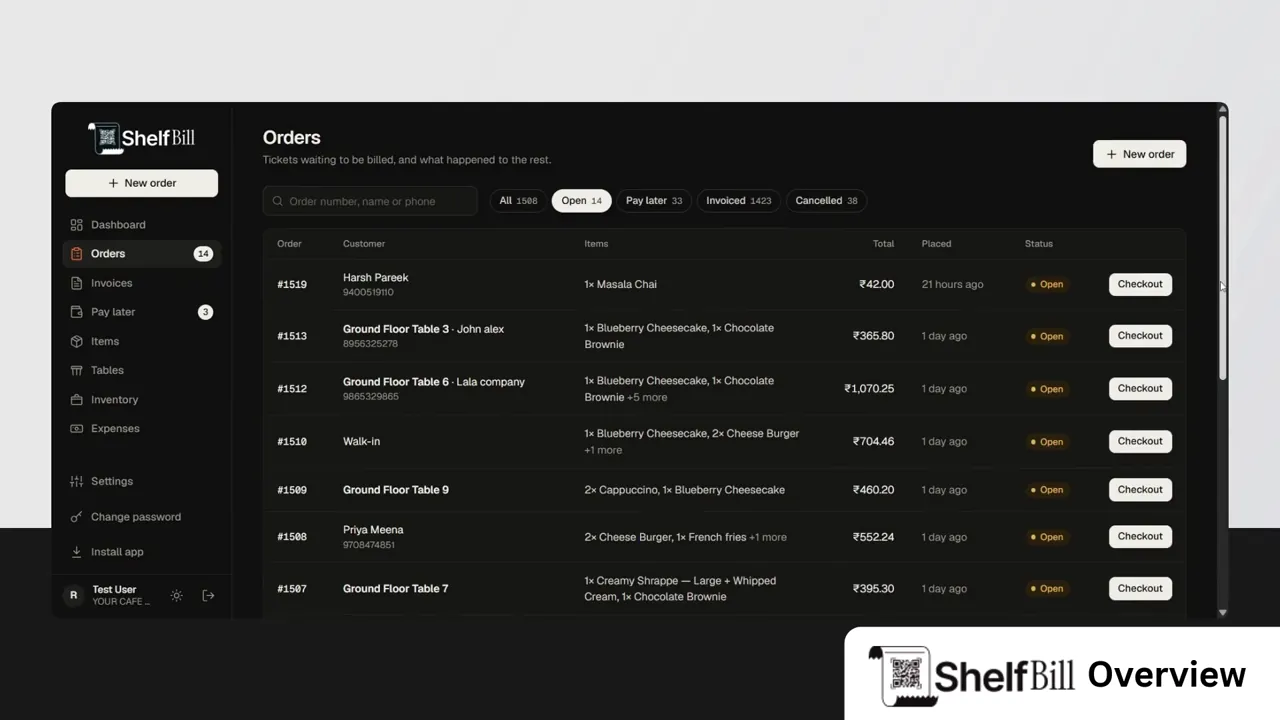
05Live orders

Every order, the moment it happens.

New orders appear on every device without anyone refreshing, with a sound and a pop-up, on whichever screen the staff are looking at.

  • Alert sound and pop-up Choose the tone and the volume in Settings. Tapping the pop-up opens the order.
  • Tabs that sort the rush All, To accept, Open, Pay later, Invoiced and Cancelled, with the count of what is waiting.
  • Updates by themselves The list changes in place. Nothing blinks, and nobody loses their place.
  • The waiting number in the tab title See “(2) Orders” even when the app is in another tab.

Takes care of: No orders shouted across the floor or forgotten.

06Tables and QR ordering

Let tables order from their own phone.

Give each table a QR code. Customers scan it, see your menu with photos, and send their order to the counter, without installing anything or logging in.

  • A QR code for every table Add ten tables in one go, then print all the codes together.
  • Customers order and add more They browse the menu, order, and add to the same order later.
  • You accept or decline An order from a phone waits for you to accept it, so nothing reaches the kitchen unchecked.
  • Occupied and free, automatically A table is busy until its order is billed. Nobody has to remember to mark it.
  • Their bill, on their phone When it is paid, the customer gets a link to their bill.

Takes care of: Fewer waiters running around, faster tables.

07Pay laterAdd-on

Udhar, without the notebook.

Give credit to regular customers and know exactly who owes what and by when. One invoice is made when they pay, with everything they bought.

  • Credit tied to a mobile number The same customer is always the same customer, however often they come.
  • A due date on every bill You set the number of days. Overdue and due-today customers are listed first.
  • Part payments Take what the customer can pay today. The balance stays on their page.
  • A reminder where you will see it The number of customers to chase sits next to Pay later in the menu.
  • One invoice at the end All the credit orders are billed together when the customer settles.

Takes care of: No forgotten dues, no guessing who to call.

08InventoryAdd-on

Stock that keeps itself.

From the supplier's invoice to the customer's plate. Packed items are counted as they are; things you make from ingredients take the ingredients out of stock on every sale.

Takes care of: No running out on a busy day, no wastage nobody sees.

  1. Supplier order
  2. Delivery received
  3. On the shelf
  4. Sold or used
  5. Counted and checked

How much of everything is left.

Every item you sell, with its quantity on hand. Sizes are counted separately, so you can see 500 ml bottles and 1 L bottles on their own.

  • Total and per-size quantity Open a row to see where the stock sits.
  • Re-order levels Set a level for an item, and when stock falls to it, the item appears on the re-order list.
  • Packed or made to order Count a packet of chips directly; let a cold coffee use up milk and coffee through its recipe.
  • Short stock is your call Either block the sale when stock is short, or allow it and let the count go below zero.

09ExpensesAdd-on

So the profit you see is the profit you have.

Rent, salaries, electricity, repairs. Write each one down with a date, and it comes off your profit.

  • Ten ready categories Rent, salaries, electricity and water, phone and internet, transport, repairs, marketing, packaging, taxes and other.
  • Dates, notes and filters Look at any month, or any one category, in a clean list.
  • Straight into the report The profit and loss shows running costs as its own line. Without the add-on, the report leaves expenses out.

Takes care of: No more profit that ignores the rent.

10Reports and profit

Are you in profit? Now you can see.

One toggle on the dashboard turns it into a full report of the business, ending in the number that matters: profit or loss, with the whole calculation shown.

  • Profit or loss, step by step Sales, less the cost of what was sold, less wastage, less running costs. Every line shown.
  • How sales were paid for Cash, UPI and pay later, side by side.
  • Best sellers and customers Who buys the most and what sells the most. Both are paged, and a page change refreshes only that table.
  • Money to collect Customers who owe you, how much, and since when.
  • Compare with the last period See whether this month is better than the last.
  • Print it Send the report to the printer or save it as a PDF.

Takes care of: Numbers scattered over a notebook, a bank app and memory become one page.

11Settings

Set it up once. It remembers.

Your shop's details, your tax setup, your paper, your safeguards and your sounds, in one tidy page.

  • Your shop Name, address, phone, state and city, GSTIN, currency symbol.
  • Tax Tax name, and whether your prices already include tax or have it added on top.
  • Invoices Prefix, footer note and paper size, with a live preview as you type.
  • Payments Your UPI ID or your own QR code.
  • Safeguards How long an invoice can be voided and the largest discount allowed.
  • Order alerts Sound on or off, tone and volume. Remembered on each device.

Takes care of: One place to make the product fit your shop.

Add-ons

Start simple. Switch on what you need.

Billing, orders, tables, invoices, the dashboard and reports come with every shop. The three parts here are added when you are ready for them, and never get in the way when they are off.

  • Items, orders and checkout
  • Live orders and table QR ordering
  • Invoices, printing and WhatsApp
  • Dashboard and reports
  • Pay laterGive credit and collect it back, with due dates and part payments.
  • InventoryStock, ingredients, recipes, purchasing, counts and wastage.
  • ExpensesRecord running costs so that profit is real.
  • Switched on for your shop by our team.

Built for the counter

The small things that matter at 8 p.m. on a Saturday.

Prints on whatever you have

A4 page, 80 mm or 58 mm thermal roll, with your shop name, GSTIN and footer note. Or send the bill on WhatsApp.

Installs like an app

Add it to the home screen of a phone or tablet. It opens straight into your shop.

GST that sorts itself

The right tax lines for a sale inside your state or outside it. HSN and SAC codes included.

Always up to date

A new order shows up on every screen within seconds, with no refreshing.

Light, dark, or both

Follows your device, or stays as you set it. Easy on the eyes at the end of a long shift.

Getting started

Three steps to your first bill.

Whatever you sell, there is a starting point.

  • Cafés and restaurants
  • Grocery and general stores
  • Vegetable and fruit shops
  • Clothing shops
  • Anything else you sell
  1. 1

    We create your login

    There is no public sign-up. Our team makes your account and gives you a temporary password, which you change on your first sign-in.

  2. 2

    Add your shop and your items

    Tell us what kind of shop it is, and we suggest a starting list of categories and items to edit.

  3. 3

    Take your first order

    Open New order, tap an item, and bill. Switch on the add-ons you want when you are ready.

Questions

Things shop owners ask first.

Who is it for?

Any shop that bills customers: cafés and restaurants, grocery and general stores, vegetable and fruit shops, clothing shops and more. When you set up, you tell us the kind of shop and we suggest a starter list.

Do I need special hardware?

No. It runs in a browser on a phone, a tablet or a laptop, and it can be installed on the home screen like an app. Bills print to a normal printer or a 58 mm or 80 mm thermal receipt printer.

Does it handle GST?

Yes. Each item has its own tax rate and an optional HSN or SAC code. Bills show CGST and SGST inside your state and IGST outside it, with your GSTIN. You can choose whether your prices already include tax.

Can customers order for themselves?

Yes, from a QR code on each table. They need no login and no app. Their order reaches your screen with an alert, and you accept it.

What if a customer wants to pay later?

With the Pay later add-on, the order is placed on credit against their mobile number with a due date. When they pay, one invoice is made for everything they bought.

Will it tell me my real profit?

Reports show sales, less the cost of what was sold, less wastage, and, with the Expenses add-on, less your running costs. The calculation is shown line by line.

How do I get an account?

Accounts are created by our team, so there is no sign-up form. Get in touch and we will set up your shop. If you already have a login, use the button at the top.

Is my shop's data kept private?

Each shop's data is kept apart from every other shop. Sign-ins are slowed down after repeated wrong passwords, temporary passwords must be changed on first use, and sensitive actions leave a record.

See your whole shop in one place.

0:00 / 1:42